How to Create Large Parentheses in Finale
If you need to create large parentheses that span multiple staves, using the default fonts may not be a good idea as they look
too bold at that size:
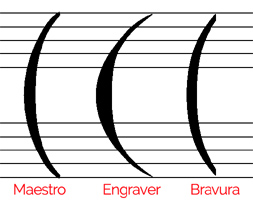
Image 1:Standard large parentheses
So you either need to create your
own parentheses shapes with Finale's Shape Designer, use vertical slurs or
3rd party fonts.
Here are some font recommendations for thin large parentheses:
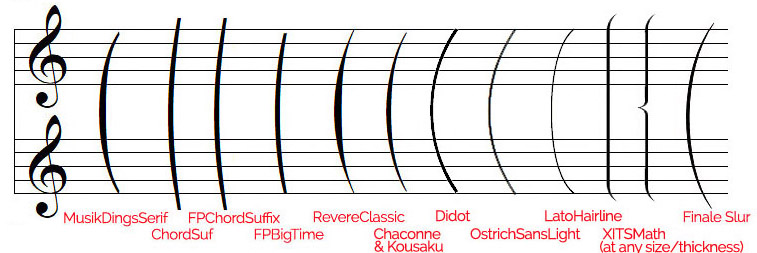
Image 2: Fonts for large parentheses
The fonts LatoHairline and XITSMath are available

in our
Elbsound Text Fonts Package which includes
450 text fonts selected especially for use in musical scores.
The two
XITS Math parentheses above are the most flexible parentheses and can be scaled to any size and thickness.
They are built of multiple elements: one at the top, one or several in the middle and one at the bottom.
Make sure to reduce the line spacing when building the expression, otherwise you will see gaps between the elements (see image 3).
If you use the curly middle element, add a some space before the other elements, otherwise they won't align.
A Finale library with two XITS Math parentheses can be downloaded
here (the free
XITS Math font must be installed!).
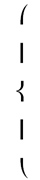
Image 3: The XITS Math parentheses elements
If you're looking for alternative text fonts with thin large parentheses, search for fonts with the tags
condensed, ultra light, tall, thin or hairline.
The last parenthesis in image 2 is a vertical
Finale slur.
Better use them with caution as they behave differently from expressions or articulations and are sometimes a bit awkward to assign to note clusters.
If you prefer the slur or even the piano brace look, you can also use Finale's Shape Designer and add the curves, slurs or parentheses as
scalable vector elements (Image 4).
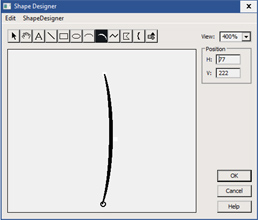
Image 4: Scalable slurs in Finale's Shape Designer
These fonts are available
for free:
MusikDingsSerif
Chaconne/Kousaku (comes with the Japanese Finale release)
OstrichSans-Light
Lato Hairline
XITS Math
Links to all fonts can be found on our
Music Font Links page.
Large square brackets can be easily created with Finale's custom line tool (Image 5).
You can adjust the thickness and hook lengths in the dialog, and the size when placing the bracket on the score.
Small square brackets (e.g. for string double stop markings) are also available in Finale's EngraverFontSet font.
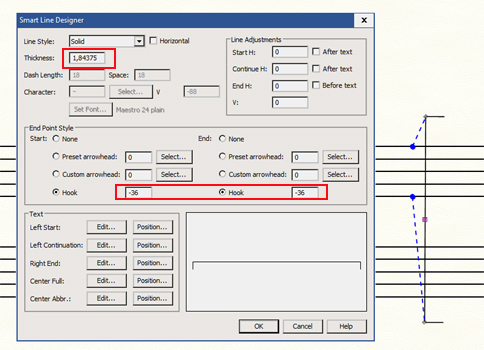
Image 5: Square brackets created with the custom line tool
Large Piano Braces
The same problem exists with large piano braces.
When taken from standard text fonts like Times New Roman, they look too bold.
It's recommended to use the symbol 0xE000 from SMuFl fonts (Image 6).
Or take the symbol from some old music fonts as listed in the
Catalog of Hard-to-Find Music Symbols.
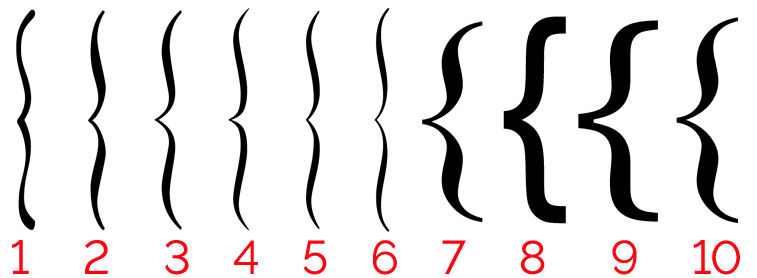
Image 6: Large Piano Braces from SMuFl and Text Fonts
The piano braces in image 6 were taken from these fonts:
1. MuseJazz
2. Aruvarb
3. Finale Maestro
4. November 2
5. Leland
6. Ekmelos
7. Times New Roman
8. Arial
9. Georgia
10. Century Schoolbook
The fonts MuseJazz, Aruvarb, Finale Maestro, Leland and Ekmelos are available
in our
Elbsound Music Fonts Package which includes
214 music fonts.
Small- and medium-sized square brackets
A few square brackes symbols are available in Finale's
EngraverFontSet font.

Image 7: Square brackets in EngraverFontSet
Lots of square brackets can be found in the
FPBracket and FPBracketBold fonts from
Bill Duncan's Finale Productivity Pack.
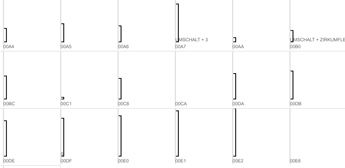
Image 8: Examples of square brackets in FPBracketsBold
Some medium to large-sized square brackets can also be found in the
Figurato font included in the
Elbsound Music Fonts Package.
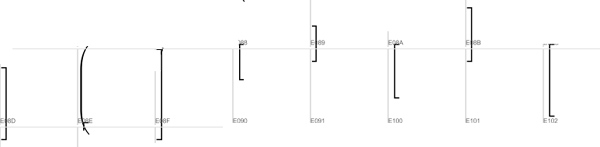
Image 9: Examples of square brackets in Figurato
As far as we know
Figurato is the only music font that also includes standard accidentals plus accidentals with
both square and round brackets. Unfortunately its metrics aren't compatible with Maestro, so it might need a JW Lua script or some manual adjustments to get the accidentals to work in Finale.

Image 10: Accidentals with Figurato
Figurato is also included in our
in our
Elbsound Music Fonts Package.
